Sunday, 9 June 2013

How To create a New General Ledger Account

Enter Transaction FS00 into the SAP command prompt  , click execute.


sap fi certification

In the Edit G/L Account Screen

Enter G/L Account no.
Company Code
Click Create.
Note , SAP provides you an option to  create a GL account with reference to another GL account. More on this later in the tutorial.

sap fi certification material

In the next screen
  1. Enter Account Group
  2. As per the type of G/L Account you are creating select either the P&L Statement Acct or the Balance Sheet Account radio button.
  3. In the Short Text field, enter a short description for the new GL account.
  4. In the G/L Acct Long Text field, enter a detailed description for the new GL account.


sap fi create a new general ledger account

  • Click on the Create/Bank/Interest tab.
  • In the Field Status Group, select a GL field status group

Wednesday, 8 May 2013

How to Create Retained Earnings Account

This tutorial demonstrates how to create Retained Earnings Account

Enter Transaction code SPRO in the command field


sap fi

In the next screen Select SAP reference IMG

sap fi certification

In next screen-"Display IMG"  navigate the following menu path :

SAP Customizing⇒Implementation Guide⇒Financial Accounting ⇒General Ledger Accounting⇒G/L Accounts ⇒Master Data⇒ Preparations⇒ Define Retained Earnings Account

sap fi certification questions

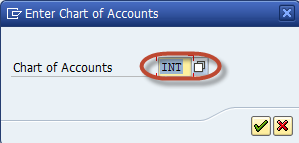
In the next screen,  Enter the Chart of Accounts to maintain the Retained Earnings Account

Sunday, 7 April 2013

How to Create Chart of Accounts (COA) Account Group

This tutorial takes you through the steps to create a COA Account Group

Enter Transaction code SPRO in the command field

sap fi certification

In the next screen Select SAP reference IMG

sap fi certification

In next screen-"Display IMG"  navigate the following menu path

SAP Customizing Implementation Guide -> Financial Accounting -> General Ledger Accounting

-> G/L Accounts -> Master Data -> Preparations -> Define Account Group

sap fi create chart of accounts account group

In the next screen, select New Entries

sap fi certification material

Saturday, 2 March 2013

Create Chart of Account

How to Create Chart of Accounts

The following tutorial takes you through the steps to create Chart of Accounts


Enter Transaction code SPRO in the command field


sap fi

In the next screen Select SAP reference IMG

sap fi certification

In next screen-"Display IMG"  navigate the following menu path :  SAP Customizing Implementation Guide -> Financial Accounting -> General Ledger Accounting -> G/L Accounts -> Master Data -> Preparations -> Edit Chart of Accounts List

sap fi certification questions

In the next screen, select New Entries

Tuesday, 5 February 2013

Create a Company and assign to Company Code

How to Create a Company Code and Assign to a Company

This is a 2 Step Process

  1. Define Company Code
  2. Assign Company to Company Code

Define Company Code

Enter Transaction code SPRO in the command field


sap fi

In the next screen Select SAP reference IMG

sap fi certification

In next screen Display IMG follow the menu path

SAP Customizing Implementation Guide -> Enterprise Structure ->Definition->Financial Accounting->Edit, Copy, Delete, Check Company Code

sap fi certification questions

Thursday, 3 January 2013

How to Create a Company

Define Company

Enter Transaction code SPRO in the command field

sap fi

In the next screen Select SAP reference IMG

sap fi certification

In next screen Display IMG follow the menu path

SAP Customizing Implementation Guide -> Enterprise Structure -> Definition-> Financial Accounting -> Define Company

sap fi certification material

In the next Screen

1)    Press New Entries

sap fi certification questions

In the next Screen Enter the Company Details :
  1. Enter a unique Company Id for the Company within your corporate group
  2. Enter the Company Name
  3. In the Detailed Information Section Enter the Company Address details such as Street , PO Box, Postal Code, City
  4. Select Country code for country the company is established
  5. Select Default language for the Company for Print forms and  Default Texts
  6. Select a Local Currency for the Company
sap fi define company

After completing all the required information ,press save How to Create a Company Enter your customizing request number

sap fi create company

and your company is created.